🧾 Glossary
This glossary contains key terms used throughout the InterLIR documentation, including business concepts, technical terms, and platform-specific actions.
ASN
ASN stands for Autonomous System Number. It is a unique identifier assigned to an autonomous system (AS) in the Internet that participates in the Border Gateway Protocol (BGP). An autonomous system is a collection of connected Internet Protocol (IP) routing prefixes under the control of one or more network operators that has a single, clearly defined routing policy.
In practical terms, an ASN is used by routers in the Internet to exchange information about IP routing paths. Each AS has a unique ASN, which is used to identify it to other ASes and to BGP routers in the Internet. This enables routers to determine the best path for traffic to take as it travels between different ASes and across the Internet.
ASNs are assigned by the Internet Assigned Numbers Authority (IANA) to regional Internet registries, which in turn allocate them to individual organizations or Internet Service Providers (ISPs) that operate autonomous systems.
Allocation Type
Allocation Type is a key attribute of every IPv4 IP-Block on the InterLIR platform. It describes how the block is classified in the Regional Internet Registry (RIR) WHOIS data (for example, the RIPE NCC database, the ARIN registry, or the APNIC whois), and reflects the status of the parent resource in that database—not a label chosen on the platform.
The value is set automatically when the IP-Block is imported and does not change for the lifetime of the listing on InterLIR. It always mirrors authoritative RIR data, including from inetnum and related objects where applicable. If the status changes in the registry (for example, after a transfer), that usually means the resource must be re-imported under the correct Supplier account, not “edited” in place on InterLIR.
What it represents
In practical terms, Allocation Type helps answer how the space was issued and intended to be used (e.g. provider space vs end-user space, and portability expectations). It is distinct from Usage Type (inferred use such as hosting vs residential) and from Subnet Status (internal or legacy operational labels in documentation).
Why it matters
For Suppliers, the classification affects leasing and redistribution expectations under RIR policy: some types are associated with more flexibility, others with stricter “internal use” rules. For Customers, it adds transparency about the origin and nature of the range before they place an Order through the Marketplace.
Where it appears
- Marketplace — Shown in the IP Block Status column (on by default, between Price and RIR), with a tooltip. You can browse and order using filters; Allocation Type is often combined with the RIR filter (for example, “ARIN — DIRECT ALLOCATION”).
- Order and IP-Block details — Visible in the relevant tables and in the Geo & Types section on the block page.
Typical values by RIR (reference)
ARIN
- DIRECT ALLOCATION — Allocated directly to an organization; may be used internally or redistributed according to policy.
- DIRECT ASSIGNMENT — Assigned to an end user for its own use.
- REALLOCATED — Sub-allocated by an upstream provider, with possible further distribution.
- REASSIGNED — Delegated to a customer for exclusive use, without sub-delegation rights to others.
APNIC
- ALLOCATED PORTABLE / ASSIGNED PORTABLE — Portable expectations where policy allows.
- ALLOCATED NON-PORTABLE / ASSIGNED NON-PORTABLE — Tied to a specific provider; not portable between providers.
RIPE NCC
- ALLOCATED PA (Provider Aggregatable) — Provider-aggregatable space for an LIR to issue assignments from.
- ASSIGNED PI (Provider Independent) — Provider-independent space assigned to an end user.
Other / historical
- LEGACY — Aligns with Legacy number resource space; policies and transfer rules may differ from allocations made under the current RIR system.
See: How to Import an IP-Block, How to Make an Order, How to Make an Assignment Request
Auction
An Auction is a sales mechanism on the InterLIR platform that allows Suppliers to sell their IP-Blocks via a competitive bidding process.
The auction is created and imported by the supplier and becomes publicly available on the portal from the defined start date until the end date.
Customers can place bids on the auction during this time. The customer with the highest bid at the end of the auction is declared the winner.
See: How to Participate in an Auction
Each auction includes: - Start Date and End Date - Starting Bid — the minimum price defined by the supplier - Current Bid — the latest highest bid from customers - Instant Buy Price — a predefined price; if a customer places a bid equal to this value, they instantly win the auction
Once the auction ends, InterLIR coordinates with the supplier and the winning customer to complete the IP-Block transfer.
📝 Note: To finalize the auction, the supplier must sign the required contract through PandaDoc during the last step of the auction import process.
BYOIP (Bring Your Own IP)
BYOIP (Bring Your Own IP) is a model that lets an organization use its own or leased IPv4 address space inside third-party infrastructure—such as cloud providers, hosting platforms, or CDNs—instead of using only addresses assigned by that provider.
How it works
- The organization holds an IPv4 block (owned or leased, for example via the InterLIR Marketplace).
- The right to use the range is reflected in RIR data and any required authorization.
- A provider is authorized to announce the prefix via BGP (Border Gateway Protocol).
- The provider routes traffic to the customer’s infrastructure using that range.
Important: IP addresses are not physically moved—only routing and registry objects (as applicable) are updated.
Key benefits
- IP reputation control — preserve history of the range (often important for email, APIs, and advertising use cases).
- Portability — change providers without renumbering.
- No vendor lock-in for addressing.
- Cost — may avoid premium provider-assigned IP pricing.
Supported providers (documentation)
Major clouds document BYOIP or equivalent programs:
- AWS — Bring your own IP addresses
- Google Cloud — Bring your own IP
- Microsoft Azure — Custom IP address prefix (BYOIP)
- Oracle Cloud — Bring Your Own IP
- OVHcloud — Bring Your Own IP (BYOIP)
- IBM Cloud — Bring your own IP
- Vultr — Bring Your Own IP
Related terms
- Assignment Request — where InterLIR customers can supply a provider verification token (for example in the DESCR field) as part of onboarding; see How to Use BYOIP.
- RPKI / ROA
- Route object
- IP-Blocks
See: How to Use BYOIP, How to Make an Assignment Request
Sale Offer
A Sale Offer is a direct sales mechanism on the InterLIR platform that allows Suppliers to list their IP-Blocks for immediate purchase at a fixed price.
Unlike auctions, sale offers provide customers with a straightforward way to purchase IP blocks without competitive bidding. Customers can request details about the offer and proceed with the purchase directly through the InterLIR sales team.
Each sale offer includes: - IP Block details (size, RIR, country, status) - Fixed price per IP address - Transferability information - Private comments (visible only to InterLIR staff)
See: How to Import a Sale Offer, How to Buy an IP-Block
Assignment Request
The Assignment Request (AR) process is initiated by the Customer after successfully completing an order to rent an IP-Block. Other participants in the process include the Supplier of the IP-Block and the InterLIR Manager.
The outcome of the process is that the Customer can announce an ASN on the IP-Block using an LOA (Letter of Authorization) and utilize the rented block in accordance with the signed contract and the rules governing the use of the rented resource.
For BYOIP (Bring Your Own IP) with hyperscalers and similar providers, the AR flow can include placing the cloud provider’s verification token in registry-facing fields — see How to Use BYOIP.
See: General Terms and Conditions, BYOIP (Bring Your Own IP)
Business Account
A Business Account (BA) is a representation of your organization or registered business on the InterLIR portal.
Who can register: InterLIR does not provide services to private individuals acting solely as natural persons. You must represent a legal entity or another formally registered business (for example, a company, a sole proprietorship, or an individual entrepreneur / sole trader where that status is registered with the competent authority). We rely on documentary evidence that your business or organization exists and that you are entitled to act on its behalf.
Proof and document quality: When you import or update a Business Account, the files you upload must verify your right to register that organization on the platform. Suitable documents include, for example:
- Company registration extracts, certificates, or equivalent records from a business registry;
- Sole proprietor / individual entrepreneur (IE) or sole trader registration certificates, where applicable;
- Other official business registration documents issued for your jurisdiction.
Submit high-quality scans or photos: fully legible, complete pages, without critical information cut off or unreadable. Poor-quality uploads may delay review or be rejected.
Without a BA, you can only view the marketplace. After adding a BA, all other functions of the platform become available to you, such as renting blocks through the marketplace or renting out blocks.
See: Business Account importing process, Edit Business Account importing process
Customer
A Customer is a registered user of the InterLIR platform who rents IP-Blocks from Suppliers via the Marketplace, pays for them monthly, and interacts with blocks during the rental lifecycle.
Capabilities:
- Initiates Orders for one or more IP-Blocks
- Pays monthly through Stripe
- Submits Assignment Requests (AR)
- Submits rDNS Requests
- Cancels subscriptions at any time via the order details page
- Participates in IP auctions (bidding)
- Purchases IP blocks directly from sale offers
- Sends inquiries regarding sale offers from Suppliers
See: How to Participate in an Auction, How to Buy an IP-Block
Customers must have: - A registered account - An approved Business Account - A valid payment method (e.g., card, SEPA, iDEAL)
Supplier
A Supplier is a registered user of the platform who provides IP-Blocks for rent, auction, or sale to Customers via the Marketplace.
Capabilities:
- Imports IP-Blocks to the platform
- Publishes blocks on the Marketplace, sets pricing, availability, and lease terms
- Signs Certificate of Authorisation
- Confirms and sets up RPKI / ROA & Routes
- Approves or manages rDNS Requests
- Edits or splits blocks into sub-blocks
- Creates reserves to temporarily hide blocks from the Marketplace
- Submits withdrawal and return requests for sub-blocks
- Participates in auctions as sellers
- Creates sale offers for direct IP block sales
- Requests payouts via Stripe Connected Accounts
See: How to Import an Auction, How to Import a Sale Offer
Suppliers must have: - An approved Business Account - Completed Stripe Onboarding - At least one block imported and approved by the InterLIR team
Certificate of Authorisation
The Certificate of Authorisation is a mandatory agreement signed by Suppliers when importing an IP-Block onto the platform. This certificate signifies the Supplier's's consent for their IP-Block to be listed on the marketplace and rented out to other users.
When a Supplier imports an IP-Block, the certificate is sent to them via PandaDoc. By signing the document, the Supplier confirms their agreement to the terms of usage.
CIDR
CIDR (Classless Inter-Domain Routing) is a method for allocating and representing IP addresses and their associated routing. It uses the format IP_address/prefix_length, where:
IP_addressis the starting address of the rangeprefix_lengthis the prefix, specifying how many bits are used for the network portion
IP-Geo
IP-Geo (IP Geolocation) refers to the geographical information associated with an IP-Block or a specific IP address — the country, region, and sometimes city that geolocation services attribute to that IP.
On the InterLIR platform, IP-Geo indicates the region or country where the block is registered or most likely routed. It is helpful for clients looking to lease IP space with specific regional requirements (e.g., for latency, compliance, or localization).
IP-Geo is used by websites and online services to:
- detect the user's country;
- serve regional content;
- select language and currency;
- restrict access by region;
- check for VPNs, proxies, and suspicious traffic.
Important: IP-Geo does not always reflect the real physical location of a server or user. The data depends on RIR records, routing, and the databases of geolocation providers such as MaxMind, IPinfo, or DB-IP.
InterLIR uses multiple public and commercial geolocation providers to determine IP-Geo, including:
Note: IP-Geo data is approximate and based on public geolocation databases.
Customers can request a change of the IP-Geo for blocks in an active lease contract. InterLIR forwards approved requests to the Geo services, which make the final decision.
See: How to Change IP-Geo for Leased IP-Blocks, How to Make an Order
LOA (Letter of Authorization)
The Letter of Authorization (LOA) is a formal document issued to a client after successfully completing the Assignment Request process. This document grants permission to announce an ASN for a specific IP address range.
It includes: - Client's name and contact information - Assigned IP range - ASN details - Authorization dates - Issuer details
LIR (Local Internet Registry)
A Local Internet Registry (LIR) is an organization (usually an ISP or enterprise) that receives IP allocations directly from an RIR.
Responsibilities:
- Manage IP space
- Maintain WHOIS data
- Comply with RIR policy
- Interface with end users
Minimal Lease Period
The minimal lease period is the duration (14–60 months) during which settings made by the IP-Block owner are stored in the RIR database.
Minimal Order Period
The minimal order period is the shortest duration for which an IP-Block can be rented.
Minimal Split Size
Defines the smallest prefix into which an IP-Block can be divided for rental. For example, a /20 block can be split into /24s if allowed.
Order
An Order is the process initiated by a Customer to lease one or more IP-Blocks via the InterLIR marketplace.
The ordering workflow begins when a Customer adds IP-Blocks to their cart. Once ready, the Customer proceeds to place the order through the cart interface.
Orders may include: - A single IP-Block - Multiple IP-Blocks from one or more Suppliers
To complete an order, the registered Customer with an approved Business Account must proceed to payment from the order details page.
Lease Contract
Upon payment, a Lease Contract is automatically created between the Customer and the Supplier, facilitated by InterLIR.
- The contract defines the lease term, which is chosen during checkout.
- The minimum term depends on:
- The Minimal Order Period defined by the Supplier
- The remaining availability of the block on the platform
At the end of the lease term, the contract is automatically extended unless one of the parties initiates a cancellation request. To end an active rental on the platform in the standard way, see Order Cancellation.
Early Termination
Premature termination of the lease contract may occur under the conditions described in the:
- Terms of Service
- Specific clauses within the contract
Related: A normal end to renting is Order Cancellation (scheduled on the platform), which is separate from the early-termination terms above.
Order Cancellation
Order cancellation is how a Customer stops an active rental for one or more IP-Blocks that were ordered together under a lease contract (created when an Order is paid). It does not cut off access on the spot: it schedules a future end date, after which billing ends and the blocks return to the Marketplace for other clients.
Each active lease contract is kept in step with a subscription in Stripe for recurring payments; the same lifecycle idea applies: you choose when the contract should end, subject to Minimal Order Period and billing rules.
How cancellation works
In general:
- Open Contract Details for the lease contract (e.g. IPv4 resources → IP-Blocks and open the contract).
- Open the Cancellation (or Contract Cancellation) section.
- Click the action to request cancellation, pick an available cancellation date, enter a reason if asked, and submit.
- Confirm with the verification code sent to your email (if prompted).
- The request is reviewed; after approval, the contract or selected blocks are assigned that effective cancellation date (cancellation is scheduled).
Step-by-step UI instructions: How to Cancel an Order or Individual IP-Blocks. To cancel blocks from several contracts at once, use Bulk cancellation.
Cancellation flow (two common situations)
The diagram below shows how the start and finish dates on the lease contract connect to the auto-renewal phase and to scheduled cancellation end points. In the product logic illustrated here, the final end is often 12 months from a defined boundary: Finish date + 12 months in the first scenario, or date of cancellation attempt + 12 months in the second.

On the chart
- A — Start date (from the contract).
- B — Finish date (from the contract): end of the initial term.
- Top row — Between B and C (here Finish date + 12 months), the cancellation dates you may select can fall in that window while the Stripe subscription follows this lifecycle.
- Bottom row — In auto-renewal (after B), C is the date of the cancellation attempt; D is C + 12 months—the final end of the subscription, not the same day as the request.
What this means in practice (two common situations)
-
While the initial term is still in progress (roughly, before the finish date B in the sense of the original term). The platform only allows effective dates that respect the Minimal Order Period, often aligned to billing cycles, so the end stays in the future—not the day you open the form. The top row shows that cancellation dates (between B and C) still follow those rules.
-
During auto-renewal (after B, while the lease contract continues month to month or similar). The subscription keeps running until the selected end; in the bottom row, that end is D after the attempt at C. The next eligible options still follow the Minimal Order Period, billing periods, and the cancellation guide.
In all cases, the earliest date the UI offers also depends on the Minimal Order Period, Minimal Lease Period, and billing. Examples and step-by-step actions are in the cancellation guide.
Full contract cancellation
You can end the entire lease contract at once. This applies to single-block and multi-block orders: select all blocks in the cancellation UI, pick the date, confirm by email. After the effective date, all listed blocks are released and the contract can move to a fully Canceled state. See: How to Cancel an Order or Individual IP-Blocks.
Partial cancellation
On a multi-block lease contract, you can cancel only chosen IP-Blocks. The selected blocks get an end date; the rest of the Order / contract stays active until you cancel them too or the contract term ends. See: How to Cancel an Order or Individual IP-Blocks.
Bulk cancellation
Bulk cancellation lets a Customer submit cancellation requests for many IP-Blocks — including blocks from different lease contracts — in a single action. It is started with the Bulk cancellation button on the IPv4 Resources → IP-Blocks → Leased IPs page.
- A block can be selected only if its subscription is active and it has no active cancellation request.
- A cancellation date is chosen separately for each selected block, following the same Minimal Order Period rules as a regular cancellation.
- One reason is entered for the whole request, and one email code confirms all selected blocks.
- Each block is then reviewed by InterLIR staff and cancelled on its own selected date, exactly as with a regular cancellation.
See: How to Cancel an Order or Individual IP-Blocks — Bulk Cancellation.
Canceling the cancellation
If you have not yet reached the effective date, you can cancel the cancellation—revoke the pending request (for example with Cancel request in Contract Details)—and the lease contract continues as before. See: How to Cancel an Order or Individual IP-Blocks.
What happens after the effective date
- Billing for the canceled blocks stops as of the agreed end; until then, the subscription for those blocks can continue to bill as usual.
- IP-Blocks are returned to the Supplier side for the Marketplace according to platform rules.
- Related setup for those blocks—such as RPKI / ROA / route object configuration, Assignment Request workflow, and rDNS—is wound down or removed in line with InterLIR’s cancellation guide and your contract.
Important notes
- Email confirmation is required for the cancellation request where the product asks for a code. In bulk cancellation, one code confirms all selected blocks.
- Cancellation is not instant; it schedules an end.
- Submit requests in time — the standalone lease contract entry notes you may need to act at least 24 hours before a renewal date in some cases; follow what the UI and Terms of Service require.
See: How to Cancel an Order or Individual IP-Blocks, How to Make an Order, How to Make an Assignment Request, How to Make an rDNS Request
PandaDoc
PandaDoc is a document automation platform used on InterLIR to send and sign agreements like the Certificate of Authorisation.
Learn more
Payout Request
A Payout Request is an action initiated by a Supplier to withdraw funds accumulated from leasing their IP-Blocks via the InterLIR platform. The funds arrive on the supplier’s Stripe account as Customers pay for their block subscriptions.
Each month, Suppliers receive payments based on the conditions of each active lease contract.
To withdraw money, the Supplier must submit a Payout Request and specify a payout method.
Learn how to do this in the How to Make a Payout Request guide.
Request Statuses
- Initial – The request is open and can be submitted. As long as the Amount is greater than zero, new rental payments will accumulate in this request.
- Execution – The request has been submitted and is being processed.
- Executed – The payout has been successfully processed, and funds have been sent to the supplier.
Balance Categories (above the table)
- Available Balance – Funds that are ready for withdrawal. These funds have been fully processed by Stripe (typically takes 7–14 days).
- Available Soon – Funds pending Stripe processing. Once processed, they will move to “Available Balance”.
- Processing – Funds currently being transferred to the selected payout method.
- Paid Out – Total amount that has already been paid out to the Supplier. This is useful for tracking overall payout history.
Reports
Invoices PDF
It includes all invoices generated during the time period specified during the generation. For end-customer billing and paying an Open invoice, see Invoice and How to Pay an Invoice.
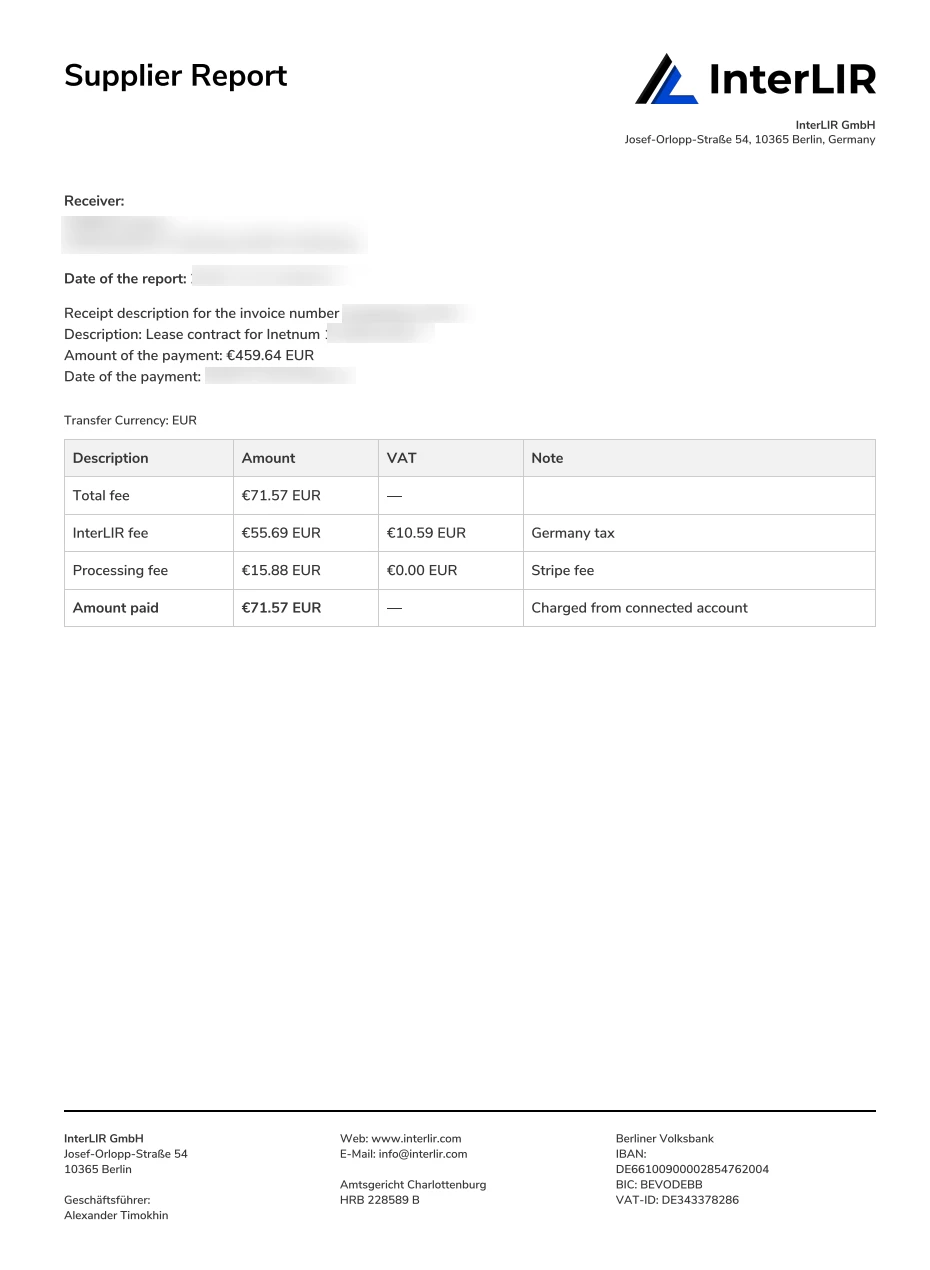
Supplier invoices
The Supplier invoices Report includes information on all Fee and VAT for all invoices that were generated during the time period specified during the declaration. The report will list the Supplier report for all these invoices.
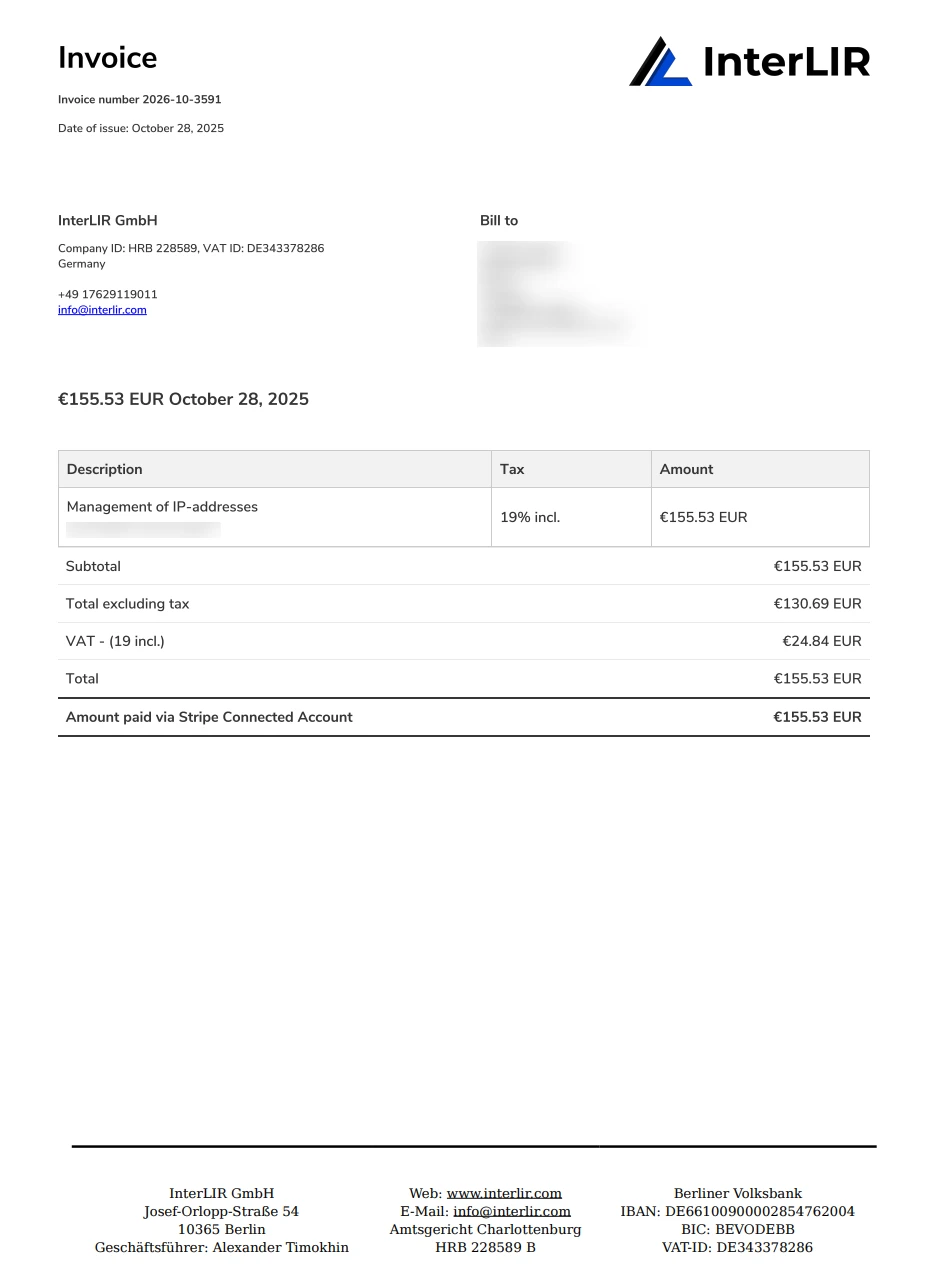
InterLIR fee invoices
The InterLIR Fees Statement Report includes a breakdown of the total platform fee and service fees charged by InterLIR for the time period specified during generation. This is particularly useful for accounting, invoicing, or financial audits.
Processing fee
The Processing Fees Statement Report details all Stripe fees applied to payment transactions included in in all invoices generated during the time period specified during the generation.
It helps Suppliers understand external processing charges applied by the payment gateway.

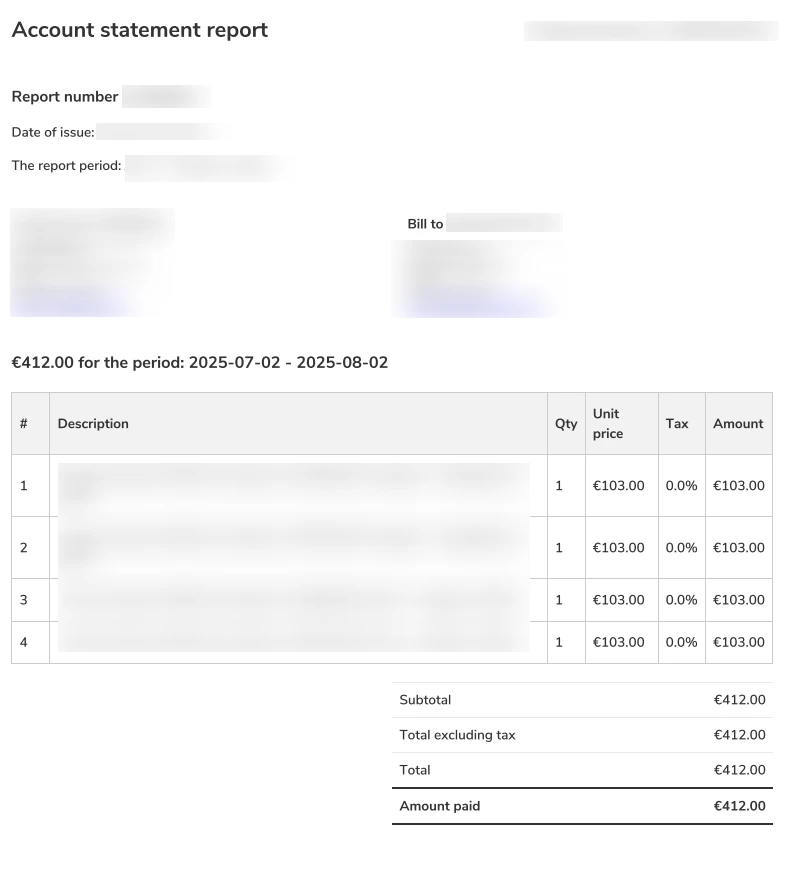
Account statement
The Account Statement Report provides a customer-level view of who paid what.
It includes a list of Business Accounts (Customers) who paid invoices, and the IP-Blocks those payments were associated with.
The data is grouped by Customer and is suitable for reconciliation and external reporting.
Payout Reports
Payout Reports are documents that can be generated after a successful Payout Request. These reports help Suppliers analyze the financial, operational, and transactional aspects of their payouts from InterLIR.
The following types of reports are available:
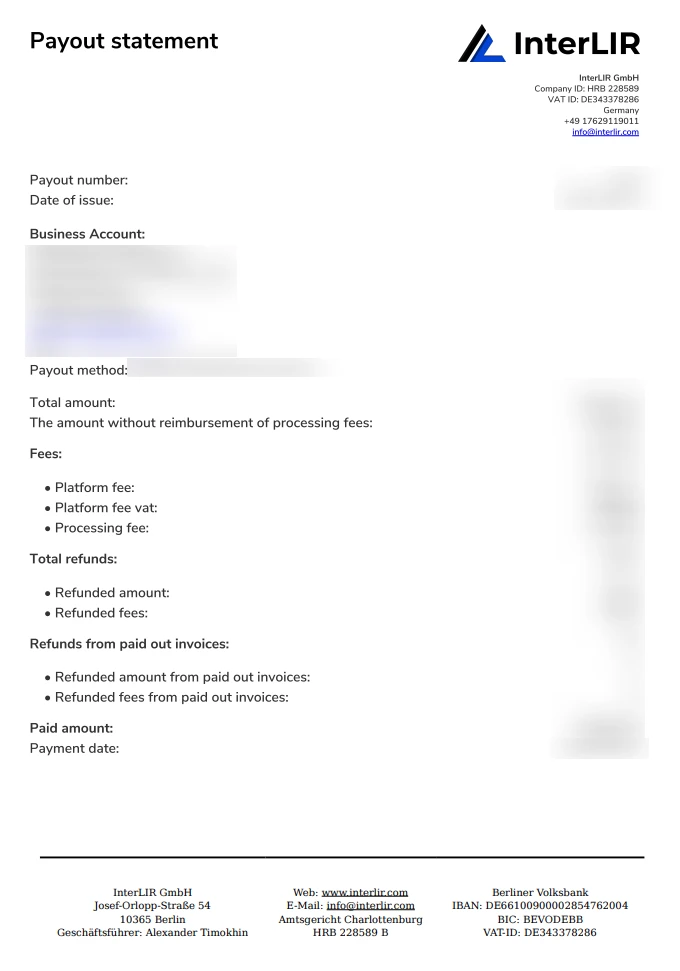
Payout Statement Report
The Payout Statement Report provides a summary of all payout-related data visible in the payout details view.
This report serves as a general-purpose overview and can be used for internal records or reporting.
Payout Fees Statement Report
The Payout Fees Statement Report includes a breakdown of the total platform fee and service fees charged by InterLIR for processing the payout.
This is particularly useful for accounting, invoicing, or financial audits.
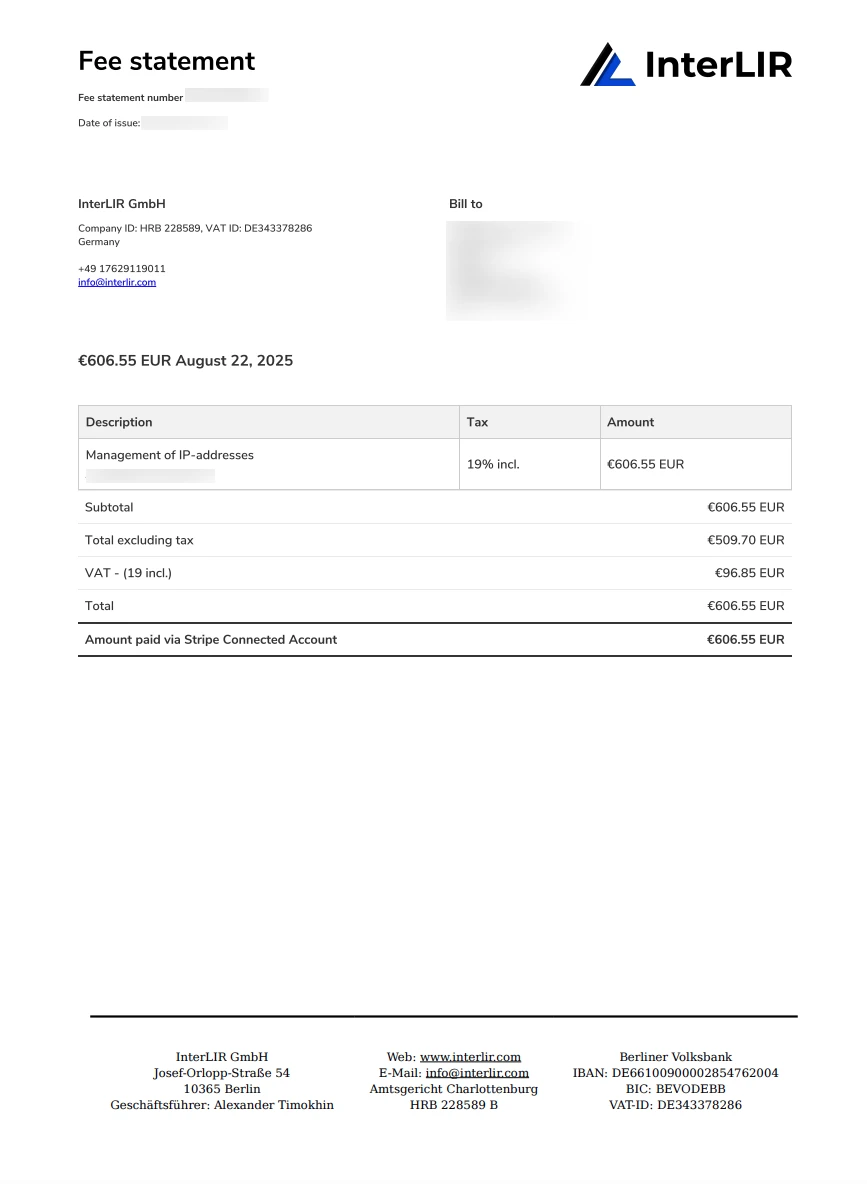
Payout Processing Fees Statement Report
The Payout Processing Fees Statement Report details all Stripe fees applied to payment transactions included in the payout.
It helps Suppliers understand external processing charges applied by the payment gateway.
Payout Account Statement Report
The Payout Account Statement Report provides a customer-level view of who paid what.
It includes a list of Business Accounts (Customers) who paid invoices, and the IP-Blocks those payments were associated with.
The data is grouped by Customer and is suitable for reconciliation and external reporting.
Payment Method
A Payment Method is the financial instrument used by Customers to pay for their IP-Block contracts.
Supported payment methods include:
- Card - Credit or debit cards
- SEPA - Single Euro Payments Area bank transfers
- iDEAL - Dutch online payment system
Payment methods are managed through Stripe and must be added to the customer's account before they can be used for payments.
Payout Method
A Payout Method is the bank account where a Supplier receives funds after submitting a Payout Request. This is the bank account of the supplier that is used by Stripe to transfer funds from the platform.
The payout method must be: - Added and verified through Stripe before it can be used on the platform - Associated with the supplier's Stripe Connected Account - Valid and active to receive payouts
To add a new payout method, follow the instructions in the How to Import a Payout Method guide.
Platform Fee
The platform fee is InterLIR's commission applied to payouts for using the platform's services and infrastructure. It is calculated and shown in payout-related views and included in the Payout Fees Statement Report.
Prefix
The prefix represents the number of leading bits in an IP-Block and defines its size.
Reserve
A Reserve is a Supplier-controlled mechanism that temporarily removes one or more IP-Blocks from the Marketplace starting from a selected date.
Once the reserve start date is reached, the reserved blocks are no longer visible to Customers and cannot be rented. The blocks remain accessible to the Supplier under the My reserves tab. Deleting the reserve immediately returns the blocks to the Marketplace.
Key characteristics:
- A reserve can target a full block or individual sub-blocks.
- One reserve record is created per block in the reserves table.
- The start date is set in UTC+0.
- A reserve can be deleted at any time — before or after it becomes active.
- Deleting a reserve does not require a grace period; the block is re-listed instantly.
Typical use cases: planned maintenance, internal network migrations.
Note: A Reserve only hides a block from the Marketplace. To temporarily remove a sub-block from platform circulation for your own use, see Withdrawal.
See: How to Reserve an IP Block, How to Import an IP Block, How to Withdraw and Return IP Sub-Blocks
rDNS (Reverse DNS)
rDNS maps IPs to domain names. Used for: - Email validation - Network diagnostics - Logging
Requires a PTR record and IP block owner control.
ROA (Route Origin Authorization)
ROA authorizes a specific ASN to originate a prefix in BGP. It's a key component of RPKI.
Route Object
A route object is a record in the IRR (Internet Routing Registry) that states which ASN is allowed to announce a given prefix.
RPKI (Resource Public Key Infrastructure)
A cryptographic framework used to validate BGP route announcements via ROAs. Helps prevent hijacks and leaks.
IP-Blocks
A contiguous range of IPs. May have statuses: - New: Awaiting approval - Suspended: Rejected or penalized - Avail: Ready to lease - Expired: Certificate expired - Occupied: Fully leased
Each IPv4 block also has an Allocation Type determined at import from RIR data.
See: IP-Block importing process
Invoice
An Invoice is the monthly bill a Customer receives for an active lease contract (Order) on InterLIR. For each full billing period, the platform issues an invoice for the use of the rented IP-Blocks. Billing is run through Stripe as a subscription linked to the contract.
How invoices are created
- Lease contracts in good standing are billed on a monthly basis (per billing period).
- The amount reflects the price of using the block(s) for that period, as set up when the Order was made.
- The contract and its billing stay in sync with Stripe.
Automatic payment
- By default, each invoice is paid automatically with the payment method on the contract (usually the one chosen at checkout).
- You can change the method later: How to Change the Payment method.
If payment succeeds — the invoice status becomes Paid and the lease contract (subscription) stays active.
If payment fails — the invoice becomes Open and you must pay it manually (see that guide) or update the payment method.
If an Open invoice is not paid in time (typically within 7 days of becoming due in line with the product), the platform may cancel the contract / subscription, deactivate the IP-Blocks for the customer, and start winding down Assignment Request and rDNS workflows as described in the cancellation and request guides. Exact grace periods follow the Terms of Service and in-product notices.
Invoice statuses
- Paid — Payment received; the subscription for that period is settled.
- Open — Payment was not taken automatically or the charge did not complete; manual payment (or a successful retry) is required within the allowed window.
- Draft — The document is not final yet; you cannot pay it.
- Void — A terminal state. Once an invoice has been voided, no further changes can be made to it. No payment is required or possible.
- Refund — The Stripe charge was refunded to the customer (for example, after a refund or dispute process). You do not need to pay the invoice again; no action is required on that document.
For step-by-step payment (portal and PDF Pay online), see: How to Pay an Invoice.
Suppliers and accounting exports are covered under Invoices PDF and the other Reports types.
Stripe
A platform for payment processing.
Learn more
Stripe Connected Accounts
Connected user accounts under the main Stripe platform account, used to process payouts to Suppliers.
Subnet Status
Possible values: - Allocated PA: Aggregated space assigned to LIR - Allocated PI: Portable space assigned to end user - Assigned: In use, not sub-allocatable - Reserved: Not routable - Available: Not yet assigned - Deprecated: Outdated
RIR (Regional Internet Registry)
Entities responsible for IP/ASN distribution.
Examples: RIPE NCC, ARIN, APNIC.
RIPE NCC
Manages IP/ASN allocation in Europe and surrounding regions. Maintains WHOIS and other registry data.
RIPE Maintainer Attributes
- MNT-BY, MNT-DOMAIN, MNT-ROUTE, etc.: define who controls resources in the RIPE DB.
ARIN Maintainer Attributes
- ORG Handle, Descr, etc.: define organization and resource metadata in ARIN’s registry.
Usage Type
Usage Type refers to the classification of how an IP-Block is typically used — for example, by a data center, an ISP, an enterprise, or for mobile, hosting, or residential purposes.
This classification helps clients on the InterLIR platform choose IP space that aligns with their technical or compliance requirements.
Usage Type examples include:
- Data Center / Web Hosting
- ISP / Fixed Line
- Residential Broadband
- Mobile / Cellular
- Corporate / Business
- Educational / Academic
InterLIR uses external geolocation and network intelligence providers to determine usage type for IP space, including:
Note: Usage type is based on public and commercial datasets and may not always reflect real-time or newly reassigned usage.
VAT
Value Added Tax applied depending on jurisdictions.
VAT Number
Required for EU companies registering a Business Account.
Check via VIES VAT Validation
Withdrawal
A Withdrawal is a Supplier-initiated request to temporarily remove one or more IP-Block sub-blocks from InterLIR platform circulation. After approval, the withdrawn sub-blocks are no longer available on the Marketplace and may be used by the Supplier for their own business needs until they are returned.
Withdrawal differs from a Reserve:
| Reserve | Withdrawal | |
|---|---|---|
| Effect | Hides the block from the Marketplace | Removes the sub-block from platform circulation |
| Own use | Block stays on the platform | Supplier may use the sub-block for own needs |
| Scope | Full block or sub-blocks | Sub-blocks only (cannot withdraw all of a parent) |
| Activation | Immediate on the selected start date | After support review and approval |
| Reversal | Delete the reserve | Submit a return request (approval required) |
Key characteristics:
- Performed at the sub-block level within an imported parent block.
- The parent block cannot be a
/24, and the last remaining sub-block of a parent cannot be withdrawn. - Active orders, reservations, or pending requests block eligibility.
- For RIPE NCC blocks, InterLIR maintainers must be restored before a return request can be submitted.
- Utilization on the dashboard is recalculated after withdrawal and return.
See: How to Withdraw and Return IP Sub-Blocks, How to Reserve an IP Block, How to Import an IP Block
WHOIS
Public database for IPs, ASNs, and domains. Lists: - Contacts - Resource ownership - Allocation/assignment data
Abuse-c attribute
The "abuse-c:" attribute is contained within the organisation object, and references a role object containing abuse contact information in an "abuse-mailbox:" attribute.
Address spaces
There are 3 types of address space: PA (Provider-aggregatable address space), PI (provider-independent address space), Legacy.
Admin-c attribute
This attribute is optional in some objects and mandatory in others. It references the primary key, or NIC Handle, of either a role or person object. It should always reference a role object, except in the role object where it optionally references nested role objects or a person object.
The reference must be the contact details of an on-site administrative contact. This contact may be a single person, or it may be a role within the organisation that more than one person takes on. These people may or may not be listed in the role object.
Allocation
An allocation is a block of IP addresses from which assignments are taken. LIRs and End Users receive an allocation from the RIR or IANA.
AS
An autonomous system is a collection of connected Internet Protocol routing prefixes under the control of one or more network operators on behalf of a single administrative entity or domain that presents a common, clearly defined routing policy to the Internet.
Aut-num object
The aut-num object serves a dual purpose in the database. As part of the RIPE Internet Number Registry, it contains the registration details of an Autonomous System Number (ASN) resource assigned by the RIR. As part of an Internet Routing Registry, it allows routing policies to be published.
DNS
The Domain Name System is a hierarchical and decentralized naming system for computers, services, or other resources connected to the Internet or a private network. It associates various information with domain names assigned to each of the participating entities
Domain object
The domain object is mainly for registering reverse delegations (number-to-name translations) in both the RIR Database and the DNS zone files. The Database is used as the management database for producing the DNS zones. No forward domain names are stored in the RIPE Database. IANA provides information about forward domains.
Inet6num object
An inet6num object contains information on allocations and assignments of IPv6 address space resources.
Inetnum object
An inetnum object contains information on allocations and assignments of IPv4 address space resources.
Internet Protocol version 4 (IPv4)
Is the fourth version of the Internet Protocol (IP). It is one of the core protocols of standards-based internetworking methods in the Internet and other packet-switched networks. IPv4 uses a 32-bit address space which provides 4,294,967,296 (232) unique addresses, but large blocks are reserved for special networking methods.
Internet Protocol version 6 (IPv6)
Is the most recent version of the Internet Protocol (IP), the communications protocol that provides an identification and location system for computers on networks and routes traffic across the Internet. IPv6 uses a 128-bit address, theoretically allowing 2128, or approximately 3.4×1038addresses.
IP
The Internet Protocol (IP) is the principal communications protocol in the Internet protocol suite for relaying datagrams across network boundaries. Its routing function enables internet working, and essentially establishes the Internet.
There are 2 internet protocols: IPv4 and IPv6.
Lease contract
After successfully paying the monthly subscription for the IP-Block through the Marketplace or a private offer from the Supplier, the Customer will see an active contract in the "IPv4 resources -> Lease contracts" section. As long as the contract is active, the Customer has the right to manage the IP-Block within the contract's terms and until the contract end date. The Customer is guaranteed the right to use the IP-Block during this period.
After the rental period specified in the contract ends, the Customer continues to be the lessee of the IP-Block until the cancellation process is completed. An automatic renewal will occur if neither party objects and will continue until one of the parties submits a request for cancellation.
To initiate the contract cancellation procedure, the Customer needs to submit a cancellation request in the "IPv4 resources -> Lease contracts -> IP-Block contract -> Details" cancellation section. After the cancellation was approved by the manager, the contract will be canceled at the end of the lease period. Please note, keep in mind that the cancelation request must be submitted at least 24h before the renewal date.
For a structured overview of how cancellation, billing, and dates work together, see Order Cancellation and the step-by-step How to Cancel an Order or Individual IP-Blocks guide.
Legacy number resource
Is an IPv4 address or Autonomous System Number (ASN) that was originally allocated to the current registrant by IANA prior to the Regional Internet Registries (RIRs) being established.
LIR
A local Internet registry (LIR) is an organization that has been allocated a block of IP addresses by a RIR, and that assigns most parts of this block to its own Customers. Most LIRs are Internet service providers, enterprises, or academic institutions.
mnt-domains attribute
Attribute is used to reference a mntner object that authorises the creation of domain objects. If no "mnt-domain:" attribute is present, one of the "mnt-by:" attributes of the parent object will be used instead.
This parent authorisation is only required when a domain object is created. This authorisation is in addition to the authorisation of the individual object itself.
mnt-lower attribute
Attribute is used to reference a mntner object that authorises the creation of more specific inetnum or inet6num objects. If no "mnt-lower:" attribute is present, one of the "mnt-by:" attributes of the parent object will be used instead.
This parent authorisation is only required when an inetnum or inet6num object is created. This authorisation is in addition to the authorisation of the individual object itself.
mnt-routes attribute
Attribute is used to reference a mntner object that authorises the creation of route or route6 objects. If no "mnt-route:" attribute is present, one of the "mnt-by:" attributes of the parent object will be used instead.
This parent authorisation is only required when an route or route6 object is created. This authorisation is in addition to the authorisation of the individual object itself.
Mntner object
Objects in the Database are protected using mntner objects. A mntner object is an anonymous box containing the credentials needed to authorise creation, deletion or modification of any objects that it protects by whomever maintains this data. Currently, these credentials are MD5 passwords or PGP keys or Single Sign-On user names from the Access system. The syntax also allows for X.509 certificates, but these are not fully implemented throughout the whois software.
Objects are protected by a mntner, if they contain a reference to the mntner in the object. This is done by including a "mnt-by:" attribute. Other “mnt-xxx:” attributes offer hierarchical protection. The "mnt-by:" attribute is mandatory in all object types.
The "mnt-lower:", "mnt-routes:" and "mnt-domains:" attributes all provide for hierarchical authorisation. These also work in a logical 'OR' when multiple values are included in an object. How they are used is described in the object descriptions where these attributes are valid.
NIR
A national Internet registry (or NIR) is an organization under the umbrella of a regional Internet registry with the task of coordinating IP address allocations and other Internet resource management functions at a national level within a country or economic unit.
NIRs operate primarily in the Asia Pacific region, under the authority of APNIC, the regional Internet registry for that region.
The following NIRs are currently operating in the APNIC region:
APJII (Asosiasi Penyelenggara Jasa Internet Indonesia), Indonesian ISP Association
CNNIC, China Internet Network Information Center
JPNIC, Japan Network Information Center
KRNIC, Korea Internet & Security Agency
TWNIC, Taiwan Network Information Center
VNNIC, Vietnam Internet Network Information Center
Indian Registry for Internet Names and Numbers
The following NIRs are currently operating in the Latin American (LACNIC) region:
NIC Mexico
NIC.br
There are no NIRs operating in the RIPE NCC region.
Notify attribute
This optional attribute specifies an email address to which notifications of changes to an object will be sent. Only the email addresses from the “notify:” attribute values contained in ‘this' object will be notified of changes to ‘this' object. Only successful changes will be notified.
ORG attribute
This optional attribute references the primary key, or id, of an organisation object that currently exists in the database.
The referenced object contains details of the organisation that holds Internet resources or secondary objects to help manage resources in the Database. In some situations, this attribute is required.
Person object
The person object provides information about a real person. The original intention was that this should only be used for contacts responsible for technical or administrative issues relating to Internet resources registered in the Database.
Provider-aggregatable address space (PA)
Is a block of IP addresses assigned by a regional Internet registry to an Internet service provider which can be aggregated into a single route advertisement for improved Internet routing efficiency. Unlike provider-independent address space, the end-user of address blocks within a provider-supplied space cannot reuse the addresses if they change up-stream connectivity providers.
Provider-independent address space (PI)
Is a block of IP addresses assigned by a regional Internet registry (RIR) directly to an end-user organization. The user must contract with a local Internet registry (LIR) through an Internet service provider to obtain routing of the address block within the Internet.
Remarks attribute
This optional attribute can be any free format text, within the allowable encoding. This attribute can even have a blank value and be used as a spacer to separate different parts of the information in an object.
Reverse DNS
Reverse DNS delegations allow applications to map to a domain name from an IP address. Reverse delegation is achieved by use of the special domain names in-addr.arpa (IPv4) and ip6.arpa (IPv6).
RIR
A regional Internet registry (RIR) is an organization that manages the allocation and registration of Internet number resources within a region of the world. Internet number resources include IP addresses and autonomous system (AS) numbers.
There are 5 RIRs:
The African Network Information Center (AFRINIC) serves Africa.
The American Registry for Internet Numbers (ARIN) serves Antarctica, Canada, parts of the Caribbean, and the United States.
The Asia-Pacific Network Information Centre (APNIC) serves East Asia, Oceania, South Asia, and Southeast Asia.
The Latin America and Caribbean Network Information Centre (LACNIC) serves most of the Caribbean and all of Latin America.
The Réseaux IP Européens Network Coordination Centre (RIPE NCC) serves Europe, Central Asia, Russia, and West Asia.
ROA
Route Origin Authorisation (ROA) is a cryptographically signed object that states which Autonomous System (AS) is authorised to originate a certain prefix.
Role object
A role object is similar to a person object. However, instead of describing a single person, it describes a role performed by one or more people. This might be a help desk, network monitoring centre, team of system administrators, etc. A role object is useful since often a person performing a specific function may change while the role itself remains.
The role object should only include business information about the role. It should not contain any personal information, although it can reference person objects.
Route object
A route object contains routing information for IPv4 address space resources. Each interAS route (also known as an interdomain route) originated by an Autonomous System can be specified by using a route object for IPv4 addresses.
Route6 object
A route6 object contains routing information for IPv6 address space resources. Each interAS route (also known as an interdomain route) originated by an Autonomous System can be specified by using a route6 object for IPv6 addresses.
RPKI
RPKI is a security framework that helps network operators make more informed and secure routing decisions.
Sponsoring LIR
A Sponsoring LIR is a RIR member, which acts as an intermediary between PI and Legacy resource holders and RIPE NCC. A Sponsoring LIR shall keep the data for PI and Legacy resources of their Customers up-to-date.Transfer in the database
Suballocation
This suballocation means that the address space has been sub-allocated by an LIR to a downstream network operator that will make assignments from it. All assignments made from it are PA.
Tech-c attribute
This attribute is optional in some objects and mandatory in others. It references the primary key, or Nic Handle, of either a role or person object. It should always reference a role object, except in the role object where it optionally references nested role objects or a person object.
The reference must be the contact details of a technical contact. This contact may be a single person, or it may be a role within the organisation that more than one person takes on. These people may or may not be listed in the role object.